Removing Apps Appearing in Search Results for Irrelevant Keywords
First, in short, here is the solution: Go to Alfred's preferences, under Fatures > Default Results > Applications: Options... and ensure that the "Match Application's keywords in default results" is unchecked. Type "reload" into Alfred to refresh your results.
Read on to find out if you're interested in why this happens.
Why is iTunes (or another app) showing for irrelevant keywords?
Occasionally, you might see apps listed in your search results for letters that aren't contained in its name. For example, why is iTunes showing for the search term "co" here?
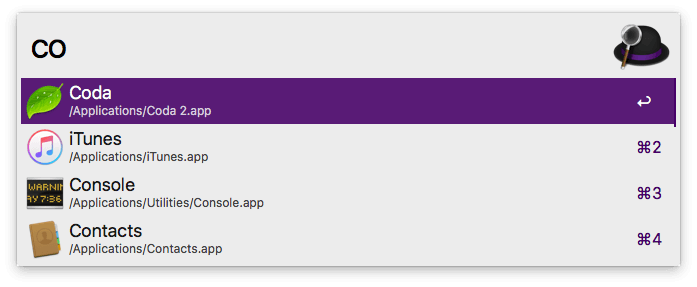
Let's take a look at the metadata, the hidden information included with every file on your Mac, which lets macOS and third-party apps like Alfred know what kind of file its looking at.
kMDItemKeywords = "Music, Radio, Apple Music, Apple Radio, iTunes Radio, Beats 1, Beats One, B1, iCloud Music Library, Apple Music Connect, My Music"
Apple has loaded the kMDItemKeywords with keywords it feels are relevant to iTunes, such as "radio", "beats" and "apple music connect" - which is where our "co" search term has come from.
Other application developers also include keywords, sometimes directly relevant, sometimes funny; the Sequel Pro app keywords contain "pancakes" for example.
If you're curious, you can perform an mdls query on your file to find out what keywords are included.
How do I deal with this? It's confusing!
In Alfred's Features > Default Results > Applications: Options..., ensure that the box next to "Match Application's keywords in default results" is unchecked. This removes any of the unnecessary metadata highlighted above from your search results. Applications will still be returned when you search for their display name.
This doesn't seem to apply to the app I'm seeing
If your results don't seem to be corrected after unchecking the box above and typing "reload" into Alfred to clear the application cache, it may be worth rebuilding your Mac's metadata index.
Take a look at our Indexing Troubleshooting page for instructions on how to rebuild your Mac's index.

