Last night, we released the 0.6 beta which you can now download from the homepage.
A lot of work has gone into 0.6, from adding new features to optimising what's already there for speed and efficiency. In summary, here are some of the key changes:
- Custom searches: Add your own sites to search with Alfred
- Optional fuzzy matching on Applications (eg. "thl" would find The Hit List)
- Rewritten word matching and relevancy parsing for efficiency, notably reducing CPU usage
- Improved default search scopes
- Assign ctrl, alt, cmd + enter to action search results
- New web searches & locales added
- Hotkey improvements including double-tapping Cmd
As usual, the full list of changes is available on the change log.
We've come a long way, baby
Over Twitter, here on the blog and in person, we often get asked "When will Alfred do X? When will this feature be added?" We love hearing your suggestions - along with our development roadmap, they help us shape the future of Alfred and work out which features you really want. It isn't always easy prioritising features, but we hope you're liking the direction the app is taking to date.
For a bit of perspective on how much has changed since the first release - a mere two months ago - here is a screenshot of the preferences when Alfred first came out on 28th February 2010.
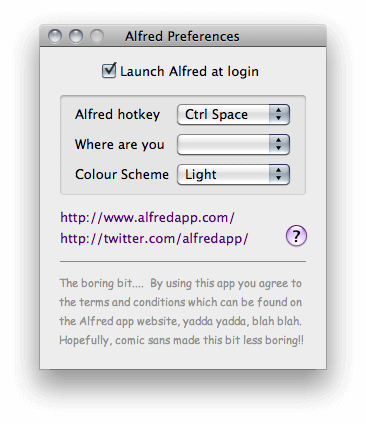
In Alfred 0.4 beta, there were only 3 preferences: Setting your hotkey, choosing from a limited number of locales and a colour theme. We find it hard to believe how much the app has changed and the community grown in little more than 8 weeks!
As we continue to develop Alfred, one of the biggest challenges will be to balance new features requests with the simplicity that makes Alfred unique.
PPC version
We have released an unsupported PowerPC version of Alfred. For PPC users who choose to download it, we recommend turning off the update checker (under General > Updates), as this tracks the Intel version of the app.
We cannot guarantee the stability of this version but first reports point to it being fully functional so, if you're a PPC user, welcome to Alfred!
It's now just over a month since we first launched Alfred. The first thing we'd like to say is a huge thank you to the +13,000 people who have downloaded Alfred, tested it, reviewed it, commented about it on Twitter or otherwise helped spread the word.
Today, we are releasing version 0.5.6 beta, the fourth public release to date. It's full of new features and improvements, as the lengthy change log shows since 0.5 two weeks ago.
A few highlights:
- Performance: Pre-caching of apps & significant speed improvements
- Basic update checker which pops up "Update available" message
- Improved local search scope preferences
- Improved relevancy and accuracy of results (This is just the start, there's still a lot to do here)
- Bit.ly shortcut creation (using "bitly" keyword)
- UI design tweaks
- Added new countries to locales
- Advanced calculator (using '=', still experimental)
The full change log is available here for the curious ones.
Email signup no longer required
When we first launched Alfred, we didn't include a way to check for updates. For that reason, we required users to sign up with an email address so that we could email everyone with updates. As a result of adding an automatic update checker, we're able to make email sign up optional.
We'll be sharing news and tips on Twitter and via our newsletter, so be sure to sign up if you want to stay in touch.
What's Next?
In the next release, we'll be focusing on further improving relevancy of searches as well as adding/improving web searches. We have dozens of tickets lined up, taking into account nearly all of the feedback we've received from users in the past few weeks.
We'll be slowing the pace down ever so slightly as we've been spending every spare hour on Alfred recently and need to catch our breath before tackling the next release.
In summary, we've loved every moment of developing Alfred and these past few weeks have reinforced our plans to continue developing great Mac software for the years to come.
Get the latest version on http://alfredapp.com, have a play and let us know on Twitter how you're finding it!
[Note: See the Change log in the Help section for the full detailed change log updates]
Version 0.5 Release Notes
New features:
- Dictionary "Spell" and "Define"
- Basic calculator
- Google's I'm feeling lucky added with keyword "lucky" (this will be improved in the future)
- Wolfram Alpha added to the standard web searchers with keyword "wolfram"
- Google translation added with keyword "translate" - Translates both sentences and websites
- Added Flickr search with keyword "flickr"
- Added Ask.com with keyword "ask"
- Spotlight Comments - you can set a comment of "ff" for Firefox and Alfred will find it
Preferences:
- Improved hotkey selection field
- Ability to change keywords for web searches
- Ability to disable unwanted websites from results
- Option to prioritise items with Spotlight Comments at the top
- Preference to save window position
- Option to always show subtext under results if available
- Preference to turn off Alfred fade-in
- Added a "Reindex" button to the experimental tab
- Ability to configure the "Esc" key behaviour
- Ability to disable "find" and "open" keywords
- Experimental feature to allow a comma as decimal separator (for locales such as Germany)
- Experimental feature to ignore the locale for Google and Wikipedia
- Option to choose how many results are shown
- Option to remove text at bottom of window
Improvements:
- Tweaks to the dark theme
- Correctly URL encode a + as %2b (which means things like Google calculator will now work)
- Locale system overhauled (need to re-set your locale)
- Remove the status bar icon before quitting so it doesn't leave a gap
- Special characters now shown correctly in hotkey field
Known issues:
- Iconography not updated in prefs due to time constraints
- Search relevance needs further improvements (main focus of next release)
- Help pages need to be populated in more details
- Spotlight Comments don't get prioritised above standard searches (eg. Spell...)
Known bugs:
- eBay URLs are incorrect
- Ampersand not encoded
- Address book: If launching a contact and there is a search in the contacts search field, the contact doesn't show
- Window positioning not remembered on first change, but remembered from 2nd move
Today is Sunday, 7th March. It's been a week since Alfred was first released out to beta users, and version 0.4.1 goes out today. To be honest, it's hard to believe it's only been a week!
Last Sunday evening, after a stretch of solid development, we decided to put Alfred out there, planning to have a nice quiet beta, sharing it with our immediate Twitter followers and Mac-using friends.
We should have foreseen it: Putting a beta invite on Twitter is like announcing a house party on Facebook. If it looks any good, everyone will want it and you'll turn around and have 100 people in your swimming pool! Thankfully, everyone was very polite and nobody threw the TV into the pool. (Phew...)
As a result of that quiet-beta-on-steroids, we received more useful feedback in the first week than we could've dreamed of. Over the past few days, we built on top of the first release to include many of the smaller preferences/functionality that you requested;
- More locations have been added.
- A smaller, less intrusive hat for the menu bar & the ability to hide it altogether
- Custom key combinations to open Alfred
- Added System Preferences Panels to default search (eg. "Appearance")
You can view the full change log here
The fancier features and advanced preferences will be added over the coming months, so please be patient with us as we integrate new ideas.
Haven't downloaded Alfred yet? What are you waiting for!? Get Alfred at http://alfredapp.com!
[Note: Change log has moved to the Help section to avoid cluttering the blog]
Version 0.4.1 Release Notes:
- Ability to hide status bar icon. When status bar icon is hidden, you see a small cog for 'preferences' on the Alfred main window.
- Changed status bar icon to a simpler hat
- More flexibility for hotkey selection
- Simple tickbox to ignore Mail.app emails in 'find' and 'open' searches
- Added System Preference Panels to default search (eg 'Appearance')
- Once launched, show Alfred on double clicking icon in /apps or the icon in the dock
- Pressing Esc clears the search term. If there is no search term, Esc will hide Alfred
- Multi page preferences dialog
- Ability to search Google Mail using 'Gmail...'
- Make 'tab' autocomplete work more reliably
- cmd + W now closes the preferences window
- Default Hotkey changed to 'alt space' - Check and update your hotkey!
Known issues:
- Wikipedia and Yahoo don't reflect country preference

